
Time Clock Software: The Complete Guide for Businesses in 2026
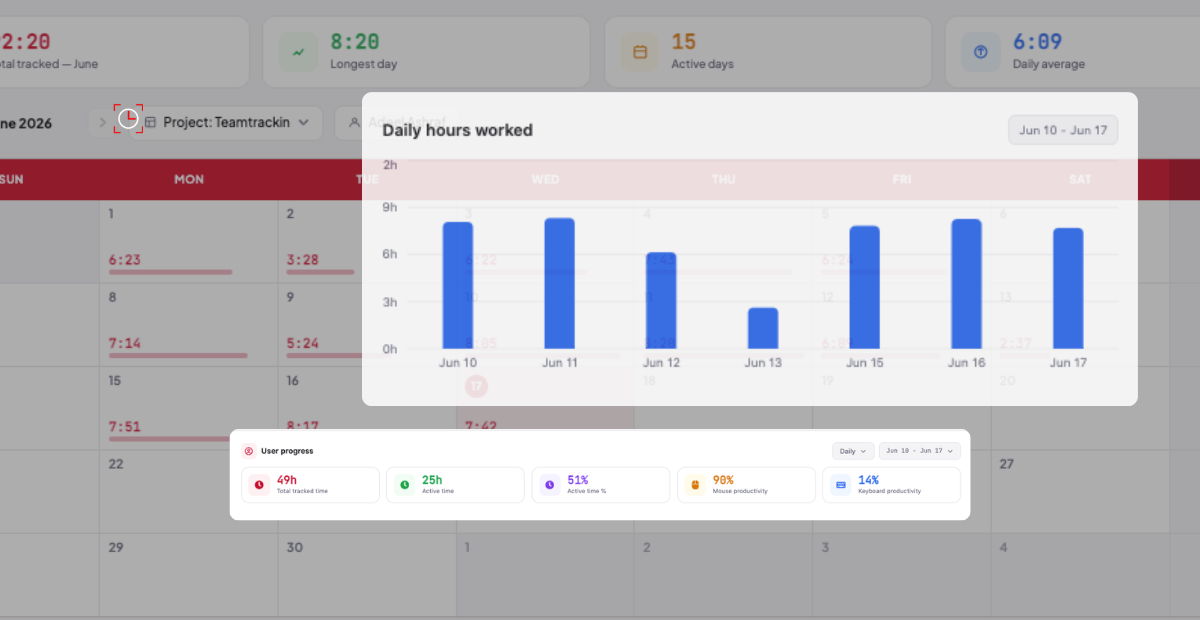
If your business relies on employees working scheduled shifts, billable hours, or project-based tasks, there is one question that quietly costs you money every single day: are you tracking time accurately?
For decades, businesses relied on paper timesheets, manual punch cards, and honour systems. Employees estimated their hours. Managers approved without checking. Payroll teams did their best with the data they were given. The result? Overpaid hours, underbilled clients, and payroll disputes that drain time, money, and morale.
Time clock software exists to solve exactly this problem. It replaces guesswork with real data — capturing exactly when employees start work, when they take breaks, and when they finish. And in 2026, the best employee time clock software goes far beyond a simple punch-in system, integrating with payroll, project management, compliance reporting, and workforce analytics.
In this guide, we cover everything you need to know: what time clock software is, why it matters, what features to look for, how to choose the right solution for your business — from small shops to enterprise teams — and how TeamTrackin delivers all of it in one streamlined platform.
|
📊 Did You Know? According to the American Payroll Association, businesses that rely on manual timesheets lose an average of 1–8% of their annual payroll to time theft, buddy punching, and human error. For a business with a £500,000 annual wage bill, that is up to £40,000 lost every year — money that time clock software can recover almost immediately. |
What Is Time Clock Software?
Time clock software is a digital system that records when employees begin and end their working hours. Unlike paper timesheets or manual logs, it captures this information automatically, accurately, and in real time — creating a reliable audit trail that can be used for payroll processing, client billing, compliance reporting, and workforce management.
Modern employee time clock software typically offers multiple clock-in methods to suit different working environments:
-
Web browser clock-in from a desktop or laptop
-
Mobile app clock-in for remote and field-based workers
-
GPS-based location verification to confirm employees are where they should be
-
Biometric or PIN-based clock-in from shared devices or kiosks
-
Project and task-based time logging for professional services teams
The data captured is stored centrally and made available to managers, HR teams, and payroll administrators in real time. This transforms time tracking from a reactive, end-of-week administrative task into a live operational intelligence tool — one that helps businesses understand how their workforce time is being spent, identify inefficiencies, and make better staffing decisions.
|
💡 Key Insight Time clock software is not just for large enterprises. In fact, time clock software for small businesses often delivers the highest ROI — because small teams have less administrative resources to absorb the cost of manual errors, and every incorrectly paid hour hits the bottom line directly. |
Why Time Clock Software Matters in 2026
The Cost of Inaccurate Time Tracking
The financial impact of poor time tracking is rarely visible until it is measured. When employees estimate their hours at the end of the week, they round up. When managers approve without checking, inaccuracies compound. When payroll processes these numbers, businesses pay for time that was never worked.
But the cost goes beyond payroll. For businesses that bill clients by the hour — agencies, consultancies, legal firms, IT service providers — inaccurate time logs mean under-billed projects, revenue leakage, and clients who receive no clear record of the value being delivered. Time clock software makes every hour countable and provable.
The Rise of Remote and Hybrid Work
The widespread adoption of remote and hybrid working has made time tracking simultaneously more important and more challenging. When employees are not in a shared office, visibility into how work time is being used becomes critical. The best employee time clock software accounts for this — offering GPS verification, screenshot monitoring, and activity tracking tools that give managers genuine insight regardless of where their teams are working.
Compliance and Employment Law
UK employment law, Working Time Regulations, and HMRC requirements mean that businesses need accurate records of the hours their employees work. Whether it comes to overtime calculations, rest period compliance, or a disputed employment tribunal, having a reliable, timestamped log of working hours is not just good practice — it is essential protection.
Payroll Accuracy and Speed
Integrating time clock software with payroll eliminates one of the most error-prone steps in the payroll process: manual data entry. When hours are captured automatically and fed directly into payroll calculations, the risk of human error falls dramatically — and payroll runs faster.
Key Features to Look for in Time Clock Software
Not all time clock solutions are equal. When evaluating which platform is right for your business, these are the features that separate genuinely useful software from tools that simply digitise the problem without solving it.
1. Multiple Clock-In Methods
Your workforce is not all in the same place, working the same way. The best time clock software supports multiple clock-in options — web, mobile, GPS, biometric, or PIN — so that every employee can record their time accurately regardless of their working environment. A field engineer, an office administrator, and a remote developer all have different needs. Your time clock software should accommodate all of them.
2. Real-Time Dashboard and Manager Visibility
Knowing who is currently clocked in, who is on a break, and who has not started their shift is information that managers need immediately — not at the end of the day when it is too late to act. Real-time dashboards give operational leaders instant visibility into workforce attendance and activity.
3. Automated Overtime Calculations
Overtime management is one of the most complex and error-prone areas of workforce administration. Time clock software should automatically calculate overtime based on your configured rules — whether that is anything over eight hours per day, over forty hours per week, or a custom threshold — and flag exceptions for manager review.
4. Project and Task-Based Time Tracking
For professional services businesses, time is not just an attendance measure — it is the unit of billing. Time clock software that supports project-based logging allows employees to allocate their hours to specific clients, projects, or tasks. This data then flows directly into invoicing and client reporting, creating a seamless record from hours worked to invoice sent.
5. GPS Location Tracking
For businesses with mobile or field-based workforces — construction, healthcare, logistics, facilities management — GPS-verified clock-ins confirm that employees are genuinely on-site when they record their time. This eliminates buddy punching and time fraud in environments where managers cannot be physically present.
6. Payroll Integration
The most time-saving feature of any employee time clock software is direct integration with payroll. When hours flow automatically from time tracking into payroll calculations, manual data entry is eliminated, errors are reduced, and the payroll process shrinks from hours to minutes.
7. Compliance and Audit Reporting
Every time entry should be timestamped, immutable, and auditable. Good time clock software maintains a complete historical record of all clock-ins, clock-outs, edits, and approvals — giving HR and legal teams the documentation they need in the event of a dispute or regulatory audit.
8. Leave and Absence Management
Time clock software should not operate in isolation from your leave management process. When annual leave, sick days, and absences are tracked in the same system as working hours, managers get a complete picture of workforce availability — and payroll deductions are calculated automatically.
|
✅ TeamTrackin Covers All 8 TeamTrackin's time clock software includes every feature on this list — from GPS clock-in to payroll integration, project-based tracking, and automated overtime calculations. Visit teamtrackin.com to explore the full feature set and start your free trial. |
Manual Timesheets vs Time Clock Software: A Direct Comparison
|
Category |
Manual Timesheets |
Time Clock Software (TeamTrackin) |
|---|---|---|
|
Accuracy |
Estimated, prone to rounding errors |
Automated, to-the-minute precision |
|
Time Theft / Buddy Punching |
No protection — easily exploited |
GPS, biometric and PIN verification |
|
Overtime Tracking |
Calculated manually, often missed |
Automated rules with alerts |
|
Payroll Processing |
Manual data entry — slow and error-prone |
Direct integration — fast and accurate |
|
Project Billing |
Difficult to separate hours by project |
Native project and task-based logging |
|
Compliance Evidence |
Paper records — easily lost or disputed |
Timestamped digital audit trail |
|
Manager Visibility |
End-of-week reports only |
Real-time dashboard, live clock-in status |
|
Cost of Errors |
1–8% annual payroll leakage (avg.) |
Near-zero with automated capture |
|
Setup Time |
Immediate but unreliable |
Minutes — browser or mobile, no hardware |
How to Choose Time Clock Software for Your Business
With so many options available, knowing how to choose time clock software that fits your specific business is critical. Here is a structured framework that works whether you are a retail store owner, a professional services firm, or a growing enterprise.
Step 1: Define Your Workforce Profile
Start by understanding how your employees work. Are they office-based, remote, field-based, or a mix? Do they work fixed shifts or flexible hours? Are they salaried or paid hourly? The answers to these questions determine which clock-in methods and features you actually need.
Step 2: Identify Your Primary Pain Point
Is your biggest problem payroll accuracy? Client billing? Compliance documentation? Manager visibility? Or all of the above? Prioritising the problem you most urgently need to solve will help you evaluate software against the criteria that matter most to your business — rather than being distracted by features you will never use.
Step 3: Consider Your Business Size
Time clock software for small business environments has different requirements to enterprise platforms. Small businesses typically need simplicity, affordability, and fast setup. They do not need complex configuration, dedicated implementation support, or enterprise-grade permission hierarchies. Look for a platform that is designed to scale — starting simple and growing with you as your team expands.
Step 4: Check Integration Compatibility
Your time clock software should connect seamlessly with the tools you already use — particularly your payroll provider, accounting software, and project management system. Poor integrations mean manual data transfers, which reintroduce exactly the errors that time clock software is designed to eliminate.
Step 5: Evaluate the Mobile Experience
In 2026, any time clock software that does not offer a strong mobile experience is already behind. Your employees need to clock in from their phones — whether they are arriving at a job site, starting a remote work session, or logging task time during a client visit. Test the mobile app thoroughly before committing.
Step 6: Assess Reporting and Analytics
Raw time data is useful. Intelligently structured reports are transformative. Look for time clock software that surfaces insights — overtime trends, attendance patterns, project profitability, cost per department — in a format that managers and finance teams can actually act on.
Step 7: Try Before You Buy
The best time clock software providers offer a free trial — and you should take it. There is no substitute for testing a platform with your own data, your own team, and your own workflows. A free trial lets you evaluate usability, mobile performance, and integration quality before making a financial commitment.
|
🚀 Start Your Free Trial TeamTrackin offers a full-featured free trial — no credit card required. Set up your account in minutes and see exactly how our employee time clock software fits your business at teamtrackin.com. |
How to Choose Time Clock Software for a Store or Retail Business
Retail and store-based businesses have specific requirements that not all time clock platforms address well. Here is what to prioritise if you are choosing time clock software for a store environment.
Shift Scheduling Integration
Retail operates on shifts — and your time clock software needs to know what those shifts are. When employees clock in late, leave early, or miss a shift entirely, the system should flag these exceptions immediately so managers can respond before it becomes a customer service issue.
Multiple Locations
If you operate more than one store, your time clock software needs to handle multiple locations cleanly — tracking which employees are clocked in at which site, flagging cross-location anomalies, and producing consolidated reports across all sites.
Break and Rest Period Tracking
Employment law requires that employees receive adequate rest breaks during long shifts. Time clock software for retail should track break periods automatically and alert managers if rest periods are being missed — protecting both employees and the business from compliance risk.
Simple, Low-Training Clock-In
Retail environments have high staff turnover and busy managers with limited training time. The clock-in process needs to be intuitive enough that a new employee can use it on day one without instruction. Look for a simple PIN or mobile clock-in that requires minimal setup and zero training overhead.
Payroll Ready Export
At the end of each pay period, your time data needs to flow cleanly into payroll. Whether that means a direct integration with your payroll provider or a formatted export file, the process should take minutes — not hours of manual reconciliation.
What Is the Best Employee Time Clock Software? How TeamTrackin Compares
If you have been searching for the best employee time clock software in 2026, you have likely encountered a wide range of options — from standalone time clocks to broad HR platforms with time tracking bolted on. Here is what makes TeamTrackin a compelling choice across every category of business.
Built for Real Workforce Complexity
TeamTrackin is designed for the way businesses actually operate — with remote employees, hybrid teams, field workers, and office-based staff all working alongside one another. Clock-in works via browser, mobile app, or GPS-verified location, accommodating every working environment without requiring additional hardware or complex configuration.
Project and Task-Level Tracking
Unlike basic time clock tools that simply record start and end times, TeamTrackin allows employees to log time against specific projects, clients, and tasks. This makes it the best employee time clock software for professional services teams who need to track billable hours with precision and produce client-facing time reports.
Automated Overtime and Compliance
TeamTrackin's overtime management engine automatically calculates overtime based on your configured rules and flags exceptions in real time. This removes one of the most common sources of payroll errors and gives HR teams the confidence that every overtime hour is being tracked, approved, and compensated correctly.
Real-Time Manager Dashboard
Managers do not have to wait for an end-of-day report to know what is happening. TeamTrackin's live dashboard shows who is clocked in, who is on a break, who has not started their shift, and which projects are receiving time right now. This level of visibility transforms operational decision-making.
Seamless Payroll Integration
TeamTrackin integrates with leading payroll and accounting platforms, meaning that approved hours flow directly into payroll calculations without manual data entry. This single integration typically pays for the software subscription within the first month.
Free Trial — No Commitment
TeamTrackin offers a full-featured free trial that gives you access to the complete platform — time clock, project tracking, reporting, payroll integration, and more — so you can evaluate it against your own team's needs before making any financial commitment.
Best Time Clock Software Compared: TeamTrackin vs Alternatives
|
Feature |
TeamTrackin |
Clockify |
TSheets (QuickBooks) |
Deputy |
Hubstaff |
|---|---|---|---|---|---|
|
GPS Clock-In |
Yes |
Yes |
Yes |
Yes |
Yes |
|
Project & Task Tracking |
Yes — built-in |
Yes |
Limited |
Limited |
Yes |
|
Overtime Auto-Calculation |
Yes |
Manual config |
Yes |
Yes |
Yes |
|
Real-Time Dashboard |
Yes — live |
Yes |
Yes |
Yes |
Yes |
|
Payroll Integration |
Yes |
Limited |
Native (QuickBooks) |
Yes |
Yes |
|
Workforce Management Suite |
Full suite |
Time only |
Time + scheduling |
Time + scheduling |
Time + monitoring |
|
HR & Recruitment (ATS) |
Yes |
No |
No |
No |
No |
|
Client Portal |
Yes |
No |
No |
No |
No |
|
Free Trial |
Yes |
Free tier |
30-day trial |
31-day trial |
14-day trial |
|
Best For |
All-in-one workforce management |
Freelancers & small teams |
QuickBooks users |
Shift-based businesses |
Remote team monitoring |
|
💡 Why TeamTrackin Stands Out While most time clock platforms focus on a single use case — shift scheduling, or billing hours, or remote monitoring — TeamTrackin delivers a complete workforce management platform that covers time tracking, project management, HR automation, recruitment (ATS), and client portal functionality in a single integrated solution. For businesses that are tired of managing multiple tools, TeamTrackin is the consolidation option. |
Which Businesses Benefit Most from Time Clock Software?
While virtually every business with employees benefits from accurate time tracking, certain sectors see particularly high returns:
Professional Services and Agencies
Law firms, marketing agencies, accountancy practices, and consulting businesses bill clients by the hour. For these businesses, every untracked minute is unbilled revenue. Time clock software with project-based logging and client reporting is not optional — it is the foundation of profitability.
Retail and Hospitality
Shift-based businesses need to know that employees are clocking in on time, taking the right breaks, and not exceeding scheduled hours in a way that triggers unplanned overtime costs. Time clock software gives retail and hospitality managers the visibility to manage this in real time.
Construction and Field Services
When employees are working across multiple job sites, knowing that they are on-site and working — not clocking in from somewhere else — requires GPS verification. Time clock software with geolocation confirmation is essential for construction, facilities management, and field services teams.
Healthcare and Care Sector
Care homes, community healthcare providers, and private clinics operate under strict compliance requirements around working hours and rest periods. Time clock software creates the audit trail needed to demonstrate compliance with staffing regulations and Working Time Directive requirements.
Remote and Hybrid Teams
For businesses managing distributed teams across multiple locations and time zones, time clock software is the connective tissue that keeps workforce visibility intact. Without it, managers are operating on trust alone — with no data to support resource planning, performance management, or client billing.
How to Implement Time Clock Software Without Disrupting Your Business
One of the most common hesitations about adopting time clock software is the fear of implementation disruption — getting staff to adopt a new system, migrating data, and retraining managers. Here is how to make the transition as smooth as possible.
-
Start with a pilot group. Roll out the software to one department or location first. This allows you to identify any adoption issues before scaling across the whole business.
-
Communicate the why. Employees are more likely to embrace a new system when they understand the reason for it. Frame time clock software as a tool that makes payroll more accurate and fair — not as a surveillance measure.
-
Keep clock-in simple. The clock-in method your employees use needs to be fast, intuitive, and reliable. If it adds friction to the start of every working day, adoption will suffer. TeamTrackin's mobile app clock-in typically takes under ten seconds.
-
Integrate with payroll from day one. The most powerful demonstration of the software's value is the first payroll run that happens automatically from tracked hours. Make sure the payroll integration is configured before go-live.
-
Use the reporting tools. Do not let the data sit unused. From the first week, run overtime reports, attendance summaries, and project hour breakdowns. The insights will quickly justify the investment and drive further engagement from management.
Frequently Asked Questions About Time Clock Software
What is time clock software?
Time clock software is a digital platform that records when employees start and end their working hours, replacing paper timesheets and manual punch cards with accurate, automated time capture. Modern platforms also support project-based time logging, GPS verification, payroll integration, and compliance reporting.
What is the best employee time clock software in 2026?
The best employee time clock software depends on your business size, workforce type, and integration requirements. For businesses looking for a complete workforce management platform that combines time tracking with project management, HR automation, and client reporting, TeamTrackin is a market-leading option. For freelancers or very small teams, simpler tools may suffice.
Is there good time clock software for small businesses?
Yes. Time clock software for small businesses does not need to be complex or expensive. TeamTrackin is designed to be set up in minutes, requires no hardware, and offers a free trial — making it accessible for businesses of any size. Small businesses often see the fastest ROI because every recovered payroll error has an immediate impact on a tighter budget.
How does time clock software prevent time theft?
Time clock software prevents time theft through GPS-verified clock-ins that confirm employees are on-site, biometric or PIN-based authentication that prevents buddy punching, and automated alerts when clock-ins occur outside expected working hours or locations. These controls eliminate the most common forms of time theft without requiring managers to police attendance manually.
Can time clock software integrate with payroll?
Yes. Leading time clock platforms including TeamTrackin integrate directly with popular payroll providers, meaning approved hours flow automatically into payroll calculations. This eliminates manual data entry, reduces errors, and significantly speeds up the payroll processing cycle.
How to choose time clock software for a store?
For retail and store environments, prioritise shift schedule integration, multi-location support, break tracking, and a simple clock-in method that requires minimal training. Your time clock software should flag late arrivals and early departures automatically and produce payroll-ready exports at the end of each pay period.
Does TeamTrackin offer a free trial?
Yes. TeamTrackin offers a full-featured free trial with no credit card required. You can access the complete platform — time clock, project tracking, HR tools, and reporting — and evaluate it against your business needs before committing. Start your trial at teamtrackin.com.
Conclusion: Make Every Hour Count
Time is the most valuable resource your business manages. Every hour your employees work is a cost on your P&L — and either a billable asset or a wasted one, depending on how accurately it is tracked and allocated.
Time clock software transforms this from a guessing game into a precision instrument. It tells you exactly when your team is working, what they are working on, whether hours are being used productively, and how to translate that data into accurate payroll, fair billing, and smart workforce planning.
Whether you are a small retail business trying to eliminate payroll errors, a professional services firm that needs to prove every billable hour to clients, or a growing enterprise managing a distributed workforce across multiple locations — there is a time clock software solution designed for your needs.
And if you want a platform that combines employee time clock software with project management, HR automation, recruitment tools, and a client portal — all in one integrated system — then TeamTrackin is built for exactly that.
|
👉 Get Started with TeamTrackin Today Stop losing money to inaccurate timesheets. Start your free trial at teamtrackin.com and see how TeamTrackin's time clock software can transform the way your business tracks, manages, and maximises every working hour. |

 Turkish