
Common Canonical Tag Mistakes That Hurt Rankings
Explore Common Canonical Tag Mistakes That Hurt Rankings
Canonical tags are one of the most important yet misunderstood elements of technical SEO. When used correctly, they help search engines understand which version of a page should be indexed and ranked. When implemented incorrectly, they can silently damage rankings, reduce visibility, and waste crawl budget. Many websites unknowingly lose organic traffic simply because of small canonical mistakes that go unnoticed for months.
This guide explains the most common canonical tag mistakes that hurt rankings, why they happen, and how to fix them. Whether you manage a blog, an ecommerce store, or a large enterprise website, understanding these issues will help protect your SEO performance and ensure search engines interpret your content correctly.
What Is a Canonical Tag and Why It Matters
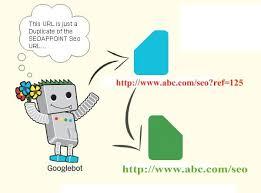
A canonical tag is an HTML element placed in the head section of a webpage. Its purpose is to tell search engines which URL represents the primary version of a page when multiple URLs have similar or identical content.
Search engines dislike duplicate content because it creates confusion about which page should rank. Canonical tags solve this problem by consolidating ranking signals such as backlinks, relevance, and authority into one preferred URL, a best practice strongly recommended by Top SEO Company in the USA to maintain consistent rankings and indexing clarity.
However, canonical tags are only hints, not commands. If search engines detect incorrect or conflicting signals, they may ignore the canonical tag entirely. That is why mistakes in canonical implementation can seriously hurt rankings instead of helping them.
Why Canonical Mistakes Are So Dangerous
Canonical issues rarely trigger warnings or penalties. Pages continue to exist, but rankings slowly drop, impressions decline, and traffic fades. Many site owners misinterpret this as an algorithm update or increased competition, when the real issue lies in technical misconfiguration.
Canonical mistakes can cause:
-
Pages to be excluded from indexing
-
Authority to be split across multiple URLs
-
Important pages to be replaced by weaker versions
-
Crawl budget to be wasted on duplicates
-
Search engines to rank the wrong page
Understanding these risks is the first step toward fixing them.
Mistake 1: Pointing Canonical Tags to the Wrong Page
One of the most damaging errors is assigning a canonical tag that points to an unrelated or incorrect page. This often happens during site migrations, template changes, or bulk SEO updates.
For example, if a blog post accidentally canonicalizes to the homepage or a category page, search engines may ignore the actual content page and rank the wrong URL. Over time, the original page may disappear from search results entirely.
Why this hurts SEO:
-
The intended page loses ranking signals
-
Search engines index a less relevant page
-
Content relevance is diluted
How to fix it:
Always ensure that each page’s canonical tag points to itself unless there is a clear reason to consolidate content. Canonical URLs must be topically relevant and contextually accurate.
Mistake 2: Using Canonical Tags Instead of 301 Redirects
Canonical tags are not replacements for redirects. This is a very common misconception. Canonical tags suggest which page should rank, while redirects actively move users and search engines to a new URL.
If a page has been permanently moved, merged, or deleted, a 301 redirect should be used instead of a canonical tag.
Why this hurts SEO:
-
Old URLs remain crawlable
-
Duplicate pages continue to exist
-
Authority is not fully transferred
Correct approach:
Use canonical tags for similar or duplicate content that must exist. Use 301 redirects when a page no longer needs to exist.
Mistake 3: Missing Self-Referencing Canonical Tags
Many websites forget to include canonical tags on pages that have only one version. While this may seem harmless, it increases the risk of duplication caused by URL parameters, tracking codes, or session IDs.
Without a self-referencing canonical, search engines may treat variations as separate pages.
Why this hurts SEO:
-
Duplicate indexing through parameters
-
Ranking signals split across URLs
-
Reduced crawl efficiency
Best practice:
Every indexable page should include a self-referencing canonical tag that points to its clean, preferred URL.
Mistake 4: Canonicalizing Paginated Pages Incorrectly
Pagination is one of the most misunderstood SEO areas. Many websites incorrectly canonicalize paginated pages such as page 2 or page 3 back to page 1.
This tells search engines that paginated pages are duplicates, even though they often contain unique content.
Why this hurts SEO:
-
Deeper pages are removed from indexing
-
Internal linking value is lost
-
Product or article discovery is reduced
Correct implementation:
Each paginated page should have a self-referencing canonical unless content is truly duplicated. Pagination exists to improve usability and content access, not to be collapsed into one page.
Mistake 5: Blocking Canonical URLs with Noindex or Robots.txt
A canonical URL must always be indexable. Blocking a canonical page with noindex or robots.txt sends conflicting signals to search engines.
This confusion can result in:
-
Canonical being ignored
-
Duplicate pages being indexed
-
Rankings dropping unpredictably
Why this hurts SEO:
Search engines cannot consolidate signals if the canonical target is inaccessible.
Fix:
Ensure canonical target URLs are crawlable, indexable, and accessible without restrictions.
Conclusion
Canonical tags are powerful when used correctly and dangerous when misused. Small implementation mistakes can silently damage rankings, visibility, and organic growth. Understanding common canonical errors allows website owners to take proactive control of their SEO performance.
By ensuring accurate canonical targets, avoiding conflicting signals, and aligning canonical strategy with content intent, websites can protect their rankings and improve crawl efficiency. Canonical tags are not just technical elements, they are trust signals that guide search engines toward the right content.
A clean canonical setup reflects a well-maintained, user-focused website, which is exactly what search engines aim to reward.
FAQs (Frequently Asked Questions)
What is the biggest canonical tag mistake websites make?
The most common mistake is pointing canonical tags to the wrong page. This often causes search engines to rank unrelated or weaker pages, leading to traffic loss and reduced content visibility.
Can canonical tags cause pages to disappear from search results?
Yes. If a page canonicalizes to another URL, search engines may remove it from indexing. This is expected behavior when canonical signals are clear and consistent.
Should every page have a canonical tag?
Yes. Every indexable page should have a self-referencing canonical tag to prevent duplication caused by parameters, tracking URLs, or session IDs.
How long does it take to fix canonical issues?
Canonical fixes usually take a few weeks to reflect in search results. Search engines need time to recrawl pages and reassess indexing signals.
Are canonical tags more important for large websites?
Yes. Large websites with filters, pagination, and multiple URL versions benefit the most from proper canonical management because duplication risks increase with scale.

 Turkish